An aging report says which invoices are open. It does not always explain why they are open or what someone should do today. A useful weekly review closes that gap without turning every overdue item into the same generic reminder.
The six-step review
- Refresh the source. Export open invoices from your accounting system and note the report date. Check that the balance is the remaining amount due, not the original invoice total.
- Reconcile changes. Confirm invoices that disappeared from the new report and any item marked paid in your working notes that still appears open. An absent row alone does not prove payment.
- Sort by attention needed. Start with missed promises, overdue next actions, and unresolved disputes. Review the rest by due date and business importance.
- Name the blocker. Record the concrete reason: missing PO, approval, dispute, cash timing, unreachable contact, or another issue. Use “unknown” when you do not know yet.
- Assign one next move. Write the action, the person responsible, and the date to check it. “Follow up” is vague; “Ask AP which PO number is missing” is actionable.
- Close the loop. Send a tailored message if needed, record any customer commitment, and verify payment in the ledger before closing the invoice.
The customer's promised payment date is a claim from the conversation. Your next-action date is when someone on your team will act or verify. Recording both prevents a promise from becoming an unowned waiting period.
A small review table
If you work in a spreadsheet, these are the minimum fields to track alongside your ledger. Keep sensitive notes only in an approved place.
| Invoice | Blocker | Owner | Next action | Check date |
|---|---|---|---|---|
| INV-1042 | Missing PO | Alex | Ask AP for required PO | Friday |
| INV-1068 | Disputed scope | Sam | Compare approved milestone | Monday |
The rows above are fictional. Orvaket provides a browser workspace for these fields, imports a flat AR CSV, and lets you export a backup. It does not update the accounting ledger or automatically email customers.
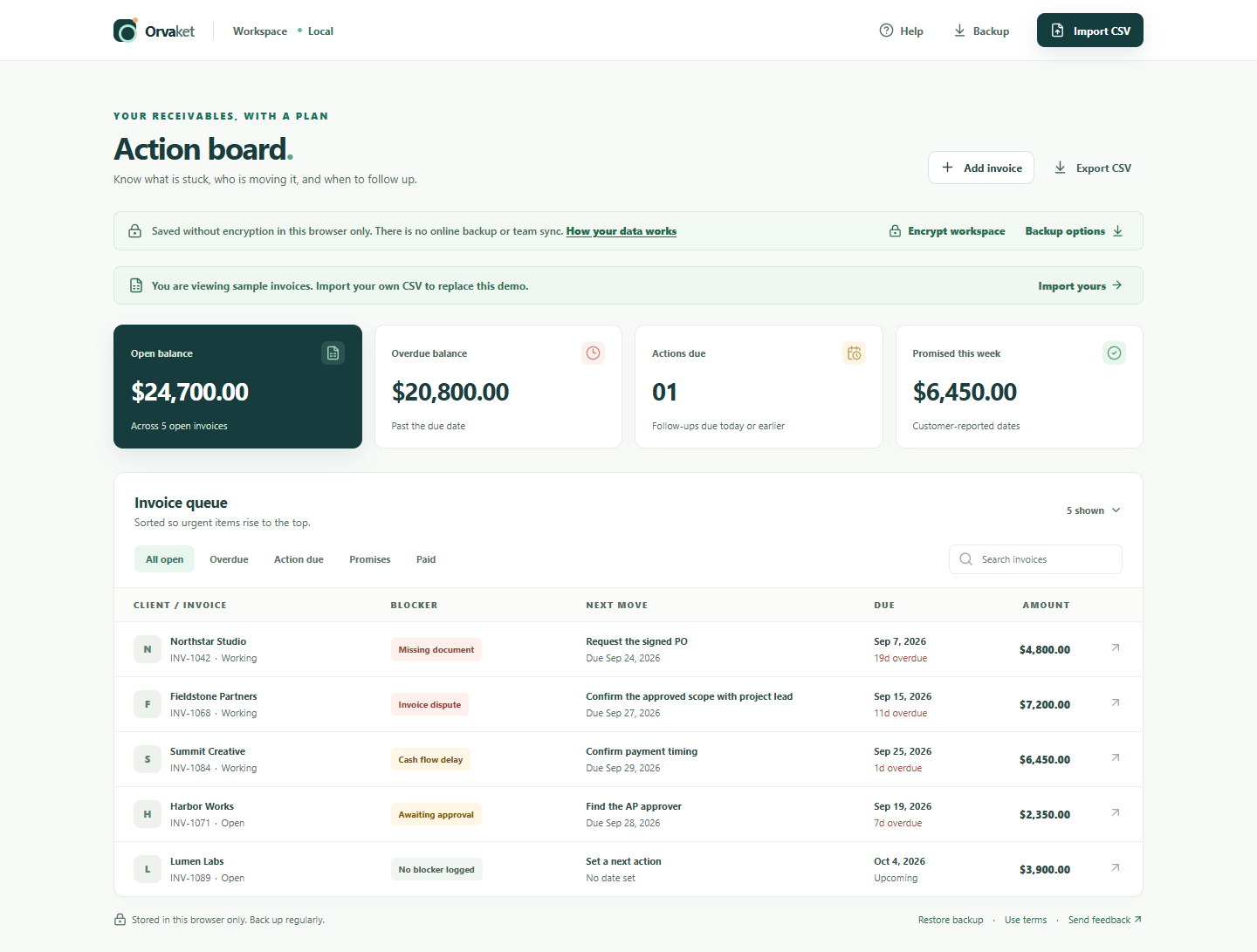
What the working board looks like
In this fictional example, the Northstar Studio invoice is overdue and blocked by a missing document. The next move is to request the signed PO. That is more useful in a weekly review than sending another generic overdue reminder. The board keeps the amount and due date in view, while the team records the reason and its next action.
Keep the routine honest
Spend the first review establishing clean records; later reviews should focus on what changed. If the report is stale or the import skipped rows, resolve that before making decisions from the board. Make the status of every promised payment visible, and count cash as collected only when it appears in the accounting system.
Run this review in a free workspace.
Try Orvaket with fictional data in one click. Your work stays in this browser; export a JSON backup to keep your own copy.
Open free workspace